Author: Happy Pachani

  • India’s First Underwater Metro Line Opened In The Kolkata

    India’s First Underwater Metro Line Opened In The Kolkata

    India has already made a big step in transport by commissioning the first underwater metro line in Kolkata. The line is a part of the East-West corridor of Kolkata Metro. It is this fresh metro route that links metropolises together and portrays the country's advancement in its inter-city infrastructures. Let us discuss this in simpler words, emphasizing how BIM was instrumental in this project.

    The Underwater Metro Route

    Inauguration and Cost

    • Inauguration: Narendra Modi, the present Prime Minister of India, opens the first-ever underwater metro route facility in Kolkata on the 6th of March, 2024. Such development was manifested through the construction of various structures such as dams, railways, and roads which symbolize steps towards a better infrastructure.
    • Cost: The whole project, which includes the underwater metro, was part of many projects to connect things, and it cost about ₹15,400 crore. This shows that India is serious about making its transportation better and connecting cities more.

    The Hooghly River Crossing

    The underwater metro route, a stretch of 16.6 kilometres connecting the twin cities of Kolkata and Howrah across the Hooghly River, is located underneath the water. Out of this distance, 10.8 kilometres are underground, including the 520-meter underwater tunnel. Think of reaching 40 meters below water level which is equivalent to 12 storey building just in 5 seconds!

    Construction Timeline

    The project’s journey began in 2010 when the contract to build the river tunnels was awarded. Construction major Afcons formed a strategic joint venture with the Russian company Transtonnelstroy, which had prior experience building a road under the sea in Iran. The actual digging of the Hooghly tunnels commenced in April 2017 and concluded in just 67 days—a testament to efficient planning and execution.

    BIM in Action

    Building Information Modeling (BIM) played a pivotal role in the underwater metro’s construction. Here’s how:

    • Design and Visualization: BIM helped engineers and architects make a detailed 3D model of the whole project. This digital model made it easier for everyone involved to see and understand how the tunnels and stations would look.
    • Collaboration and Coordination: BIM helped different teams like structural engineers, MEP experts (mechanical, electrical, and plumbing), and construction managers to work together smoothly. They were able to find and fix any problems before they started building.
    • Construction Simulation: BIM simulations helped them figure out the best way to build things. The team looked at different options to decide how to dig tunnels in the safest and least disruptive way.
    • Cost Estimation and Monitoring: BIM gave precise guesses about how much everything would cost from start to finish. It also helped keep track of spending as the project went along, making sure they didn't go over budget.

    Safety and Innovation

    Safety played a critical role at every stage of underwater tunnelling. The Twin-Tube excavation was planned down to the finest detail to be able to withstand water pressure and seismic forces. The employment of specific materials and reinforcement was a prerequisite for their stability.

    India’s Deepest Metro Station

    The deepest metro station in India is Howrah Metro Station, built on the underwater way. This metro station is 30 meters away under the ground. Its design includes safety features, effective ventilation, and emergency exits among other things.

    Conclusion

    India’s first underwater metro is not just a transportation milestone; it’s a testament to human ingenuity and collaborative efforts. As we celebrate this achievement, let’s appreciate the fusion of tradition and modernity—the traditional methods of tunnelling meeting cutting-edge technology.


    For more information about engineering, architecture, and construction, check out the Pinnacle IIT Blogs, where innovation meets reality.

    Discover more about how we're shaping the future of infrastructure and design at Pinnacle IIT.

    Subscribe to our YouTube Channel and blog post page to get all the latest updates in the world of construction.

  • BIM and GIS: How it is useful in the Construction?

    BIM and GIS: How it is useful in the Construction?

    The merger of geographical information systems (GIS) and building information modeling (BIM) has become an indispensable factor in architecture, engineering, and construction (AEC). Through these two technologies, a comprehensive technological system is created for not only project planning and design but also execution. Here we will explore how GIS improves the BIM workflows and that is a must for AEC professionals.

    Understanding GIS and BIM

    What Is GIS?

    GIS, or Geographic Information Systems, is a spatial data management system that captures, analyzes, and visualizes geographic information. It deals with real-world locations such as terrain, infrastructure, and natural features. It can be thought of as a digital map with layers of data, each layer representing a specific attribute (e.g. land use, elevation, utilities).

    What Is BIM?

    BIM, or Building Information Modeling, is a collaborative process that creates and manages digital representations of the physical and functional characteristics of a building or infrastructure. It goes beyond 3D modeling; BIM incorporates materials, costs, schedules, and maintenance data.

    Integration of BIM and GIS: Use and Workflow

    UseBIM WorkflowGIS Workflow
    Project PlanningCreate detailed digital representations of buildings and infrastructure including materials, costs, and schedules.Analyze and visualize geographic information related to the project site, considering factors like terrain, land use, and utilities.
    Design PhaseCollaborative creation and management of digital models, incorporating both physical and functional characteristics.Provide geospatial context to the BIM models by overlaying data like flood-prone areas, transportation networks, or utility lines.
    Environmental Impact AssessmentIncorporate sustainability considerations by analyzing real-time weather, soil quality, and vegetation data.Evaluate the environmental impact of the project using GIS data to optimize plans for sustainability and resilience.
    Infrastructure ManagementTrack assets, monitor energy consumption, and predict maintenance needs after construction is completed.Aid facility management by integrating GIS data to monitor and manage assets, predict maintenance requirements, and optimize energy usage.
    Geolocating BIM ModelsUse tools like ArcGIS Pro to accurately position BIM models within a geographic context.Ensure alignment of BIM models with real-world coordinates for precise geolocation.
    3D VisualizationCombine real-world mesh data with BIM models to create 3D visualizations of construction plans.Publish 3D scenes for sharing with stakeholders, enhancing communication and collaboration.
    Building Scene LayersUtilize ArcGIS Pro to construct Building Scene Layers from BIM models, organizing and displaying BIM data effectively.Organize and display BIM data in a manageable way for analysis and presentation.
    Connecting BIM and GIS DataIntegrate BIM data with GIS datasets, such as overlaying land use zoning or transportation networks onto BIM models.Enhance urban planning insights by combining BIM and GIS data for a comprehensive view of the project environment.

    The Mix of GIS and BIM

    1. Why It Matters: Combining GIS and BIM has lots of benefits:

    • Getting the Big Picture: GIS adds real-world context to BIM models. You can see things like flood zones or roads in your building design, helping you make better decisions.
    • Checking Environmental Impact: GIS helps figure out how a project affects the environment. By using data about weather, soil, and plants, designers can plan in a way that's good for nature.
    • Managing Infrastructure: After a building is up, GIS helps keep track of things like assets and energy use and predicts when maintenance is needed.

    2. How They Both Work Together

    A] Putting BIM Models on the Map: It's meaningful to place BIM models correctly on the map. Technology such as ArcGIS Pro helps with this.
    B] Seeing Plans in 3D: For instance, if you can add real-world data to BIM models, you will demonstrate construction plans in 3D. Such guidelines help to make the information more accessible.
    C] Using Building Scene Layers: ArcGIS Pro arranges and displays BIM data structurally and clearly.
    D] Bringing BIM and GIS Together: Through merging BIM and GIS data, you can derive useful information for planning, for example, the place to construct or place building in a city.

    3. Moving Away from Old Ways: Why GIS Matters

    • Old Methods Were Slow: In the past, construction pros used paper and manual measurements, which were slow and prone to mistakes.
    • GIS Makes a Difference: GIS changes things by helping pros make better decisions, work together easily, and save time by streamlining processes.

    Conclusion:

    Building Information Modeling (BIM) and Geographic Information Systems (GIS) is not only the trend. It is essential to develop smarter and sustainable buildings. It is time to bid goodbye to old methods and embrace the combined force of GIS and BIM that are now taking over.

    The direction builds the bridge from old methods to new technologies. Let's cultivate a world where each structure is a spatial storyteller.


    For more information about engineering, architecture, and construction, check out the Pinnacle IIT Blogs, where innovation meets reality.

    Discover more about how we're shaping the future of infrastructure and design at Pinnacle IIT.

    Subscribe to our YouTube Channel and blog post page to get all the latest updates in the world of construction.
  • Why BIM is better than Traditional Methods in Construction?

    Why BIM is better than Traditional Methods in Construction?

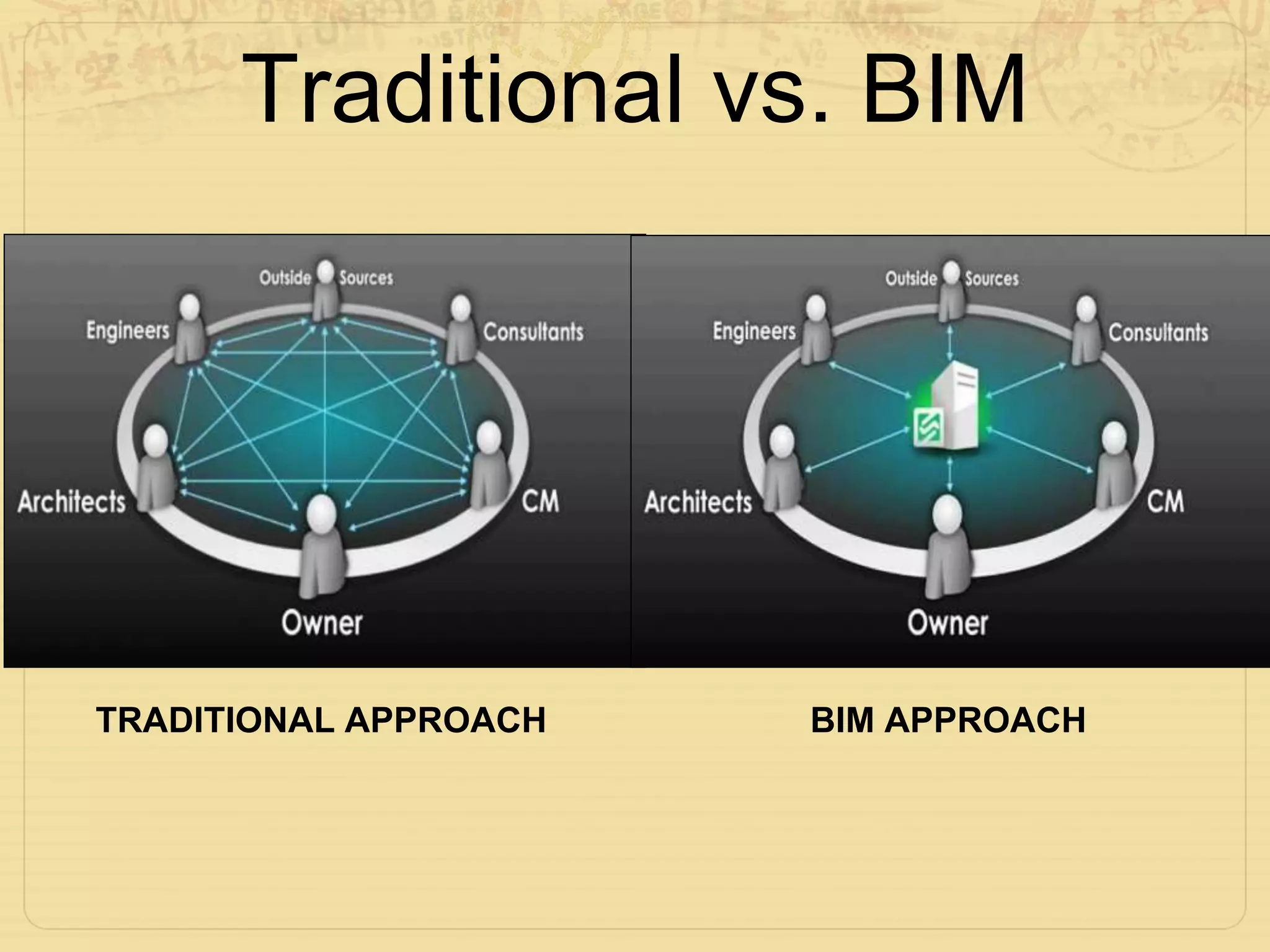
    Enter Building Information Modeling, a digital approach that transcends the limitations of traditional methods. BIM is a comprehensive process that involves creating and managing digital representations of the physical and functional characteristics of places. Unlike traditional methods, which rely heavily on 2D drawings and manual coordination, BIM encompasses a three-dimensional, intelligent model that offers a holistic view of the project.

    In the dynamic construction world, the clash between Building Information Modeling (BIM) and traditional methods is akin to a battle of titans. Why is BIM gaining momentum, and how does it surpass traditional approaches? Let’s explore these construction giants' intricacies, pitfalls, and triumphs.

    What Makes BIM Stand Out?

    1. Digital Transformation:

    • Traditional: Relies heavily on 2D blueprints and manual documentation.
    • BIM: Using 3D models to make a digital copy of a building, showing it more accurately and in a more fascinating way.

    2. Data Integration:

    • Traditional: Information is spread out in different papers and with different people.
    • BIM: Brings together information from different places, making it easy for everyone to work together with the latest information.

    3. Collaboration and Communication:

    • Traditional: There are often gaps in communication and chances for misunderstandings.
    • BIM: Facilitates collaboration by offering a shared platform where architects, engineers, contractors, and other stakeholders collaborate in real-time.

    4. Lifecycle Management:

    • Traditional: Primarily focuses on the construction phase, often neglecting the entire lifecycle.
    • BIM: Encompasses the entire lifecycle, from design and construction to maintenance and eventual decommissioning, promoting sustainability and long-term planning.

    5. Risk Mitigation:

    • Traditional: Changes or discrepancies may lead to rework and delays.
    • BIM: Identifies clashes and issues during the design phase, reducing the likelihood of errors during construction and minimizing costly modifications.

    6. Fabrication and Simulation:

    • Traditional: Limited ability to visualize the final product before construction commences.
    • BIM: Empowers stakeholders with 3D visualization and simulation, enabling informed decisions and better project outcomes.

    7. Cost Evaluation and Analysis:

    • Traditional: Cost estimates may lack precision due to limited data.
    • BIM: Provides more accurate cost projections by analyzing data and simulating various scenarios during the planning stage.

    How BIM Enhances Efficiency Compared to Traditional Methods

    Building Information Modeling (BIM) is like a superhero in the construction world, bringing a big wave of efficiency. It's way better than the old-fashioned methods we used to use. Imagine BIM as a smart tool that helps builders and designers work together smoothly. It's like having a high-tech blueprint that shows every little detail about a building before it's even built. With BIM, things get done faster and more accurately, making construction a breeze! Here’s why BIM shines:

    1. Precision in Planning:

    • BIM: Utilizes 3D modeling and simulation, resulting in detailed and precise project representations.
    • Traditional: Often relies on 2D drawings, leading to discrepancies and rework during construction.

    2. Resource Optimization:

    • BIM: Real-time data-driven resource management ensures optimal allocation.
    • Traditional: Struggles with suboptimal resource utilization due to limited data insights.

    3. Environmental Considerations:

    • BIM: Integrates sustainability analysis tools, allowing for better evaluation and control of environmental impact.
    • Traditional: Lacks efficient mechanisms for assessing and managing environmental factors.

    4. Overall Efficiency:

    • BIM’s advantages in visualization, collaboration, and resource optimization contribute to improved efficiency and reduced rework, potentially saving costs and time.

    5. Future-Proofing:

    • BIM’s adaptability to industry trends and technological advances positions it as a more future-proof construction methodology compared to traditional approaches.

    Conclusion

    Although traditional methods and BIM both have good points, BIM Modeling Services is seen as the better and more modern way, especially in today's fast-changing construction world. It connects old and new ways, making a strong base for great construction work.


    For more information about engineering, architecture, and construction, check out the Pinnacle IIT Blogs, where innovation meets reality.

    Discover more about how we're shaping the future of infrastructure and design at Pinnacle IIT.

    Subscribe to our YouTube Channel and blog post page to get all the latest updates in the world of construction.
  • Top 8 BIM Software in the Year 2024

    Top 8 BIM Software in the Year 2024

    Introduction to BIM Software

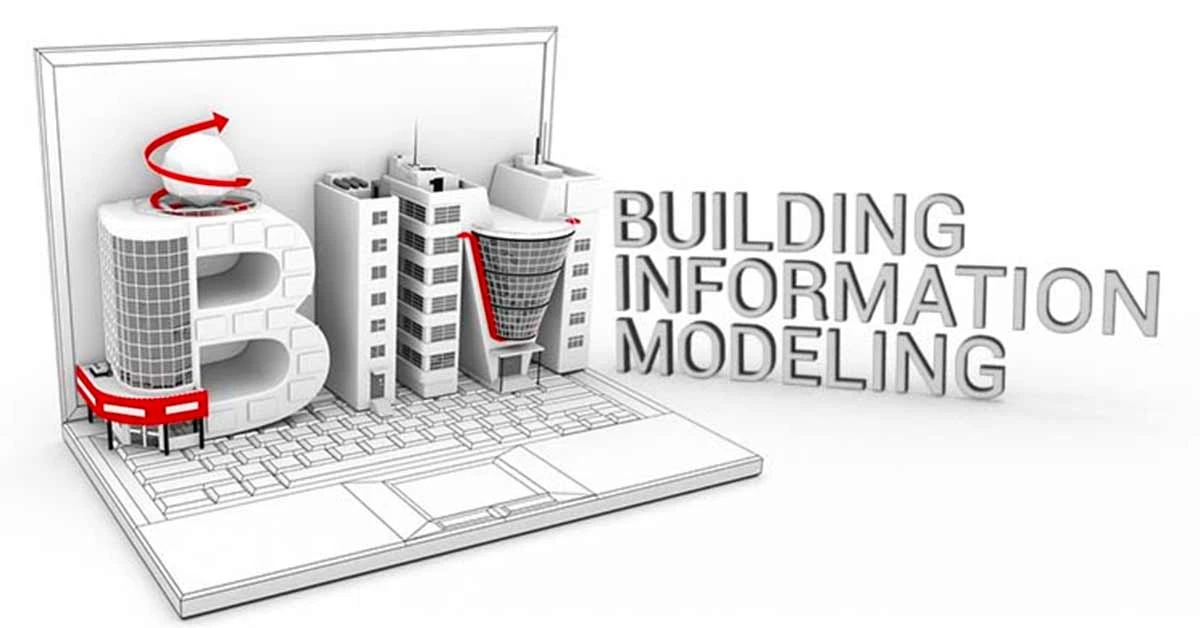
    In the dynamic world of architecture, engineering, and construction (AEC), Building Information Modeling (BIM) has emerged as a game-changer. BIM is not just a buzzword; it’s a transformative process that revolutionizes how we plan, design, construct, and manage buildings and infrastructure. By creating a shared repository of project data, BIM software ensures that designers, managers, and stakeholders stay on the same page throughout the project lifecycle.

    In this comprehensive guide, we’ll explore the world of BIM software, explore its types, and unveil the top BIM solutions for 2024 and beyond. Whether you’re an architect, engineer, or construction professional, this guide will equip you with the knowledge to make informed decisions about the right BIM tools for your projects.

    What Is BIM Software?

    BIM software revolutionizes the design, visualization, and management of buildings and infrastructure. It replaces traditional 2D drawings with 3D models, enabling professionals to collaborate efficiently during the design phase. By digitally representing a facility's functional properties, BIM ensures accurate and efficient construction.

    Example of a BIM software in action:

    1. An architect creates a 3D model of a building using BIM software.
    2. An engineer analyzes the model to ensure structural integrity and compliance with codes.
    3. A construction manager uses the model to plan construction activities and manage resources.
    4. Throughout the design process, professionals can interactively modify the model to address changes and challenges.

    By harnessing the power of BIM, professionals can streamline their workflows, reduce errors, and ultimately deliver high-quality, sustainable buildings and infrastructure.

    Types of BIM Used in Construction

    Before we dive into the top BIM software solutions, let’s explore the different types of BIM commonly used in the AEC industry:

    1. Geographic BIM: Integrates geographical data into BIM models, allowing professionals to analyze site conditions, terrain, and environmental factors.
    2. Structural BIM: Focuses on the structural components of a building, ensuring stability, safety, and compliance with codes.
    3. Concrete BIM: Specifically tailored for concrete structures, this type of BIM streamlines the design and construction of reinforced concrete elements.
    4. Precast BIM: Ideal for precast concrete components, such as walls, beams, and columns.
    5. Construction Management BIM: Facilitates project scheduling, cost estimation, and resource allocation.
    6. Architectural BIM: This enables architects to visualize designs, explore spatial relationships, and create stunning renderings.
    7. MEP (Mechanical, Electrical, Plumbing) BIM: Integrates mechanical, electrical, and plumbing systems into the BIM model.
    8. Infrastructure BIM: Applies BIM principles to infrastructure projects like roads, bridges, and utilities.

    Top 8 Best BIM Software for 2024

    1] Autodesk Revit:

    • Description: Revit remains a powerhouse in the BIM realm. It offers a comprehensive suite of tools for architectural design, structural engineering, and MEP (Mechanical, Electrical, and Plumbing).
    • Primary Use: Architects, engineers, and construction professionals use Revit for creating detailed 3D models, generating construction documentation, and facilitating collaboration.

    2] Autodesk BIM 360:

    • Description: BIM 360 is a cloud-based platform designed for project management, document control, and field collaboration. It streamlines communication among project stakeholders.
    • Primary Use: Project managers, contractors, and site supervisors rely on BIM 360 for real-time collaboration, document sharing, and issue tracking.

    3] Vectorworks Architect:

    • Description: Vectorworks combines BIM, 2D drafting, and 3D modelling. It’s known for its versatility and user-friendly interface.
    • Primary Use: Architects and designers use Vectorworks Architect for conceptual design, visualization, and creating construction drawings.

    4] Tekla Structures:

    • Description: Tekla excels in structural engineering, detailing, and fabrication. It’s widely used for steel and concrete structures.
    • Primary Use: Structural engineers, steel fabricators, and construction teams rely on Tekla for accurate modelling, clash detection, and quantity takeoffs.

    5] Graphisoft ARCHICAD:

    • Description: ARCHICAD pioneered BIM software. It offers intuitive design tools, real-time visualization, and seamless collaboration.
    • Primary Use: Architects and design professionals use ARCHICAD to create detailed building models, generate construction documents, and visualize designs.

    6] Microstation:

    • Description: Bentley’s Microstation is a versatile BIM solution for infrastructure projects. It emphasizes precision and interoperability.
    • Primary Use: Civil engineers, transportation planners, and GIS professionals use Microstation for road design, rail projects, and utilities.

    7] ALLPLAN BIM Software:

    • Description: ALLPLAN provides a comprehensive suite for architects, engineers, and construction professionals. It covers design, visualization, and project management.
    • Primary Use: Architects, urban planners, and construction managers use ALLPLAN for integrated BIM workflows.

    8] Autodesk Civil 3D:

    • Description: Civil 3D is tailored for civil engineering and land development projects. It combines BIM with geospatial data.
    • Primary Use: Civil engineers, surveyors, and land developers use Civil 3D for site design, grading, and earthwork calculations.

    BIM Software FAQs

    1. What is BIM software?
      BIM software offers a model-based process for designing and managing buildings and infrastructures, creating a digital representation of functional properties.
    2. Why is BIM software essential?
      BIM enhances collaboration, visualization, and efficiency, making it indispensable for modern building design.
    3. What’s the market outlook for BIM software?
      The BIM software market is projected to grow significantly, reaching $8.38 billion by 2025.

    Conclusion

    As the AEC industry continues to evolve, BIM software remains at the forefront of innovation. Whether you’re designing skyscrapers, bridges, or sustainable communities, choosing the right BIM tool is crucial. Evaluate your project needs, explore the features, and select a software that aligns with your vision.

    Remember, BIM isn’t just about models; it’s about transforming ideas into reality—one pixel, one beam, and one line at a time.


    For more information about engineering, architecture, and construction, check out the Pinnacle IIT Blogs, where innovation meets reality.

    Discover more about how we're shaping the future of infrastructure and design at Pinnacle IIT.

    Subscribe to our YouTube Channel and blog post page to get all the latest updates in the world of construction.

  • 4D BIM Modeling: It’s used in the Construction World

    4D BIM Modeling: It’s used in the Construction World

    In the dynamic world of construction, where precision and efficiency are paramount, 4D BIM modeling emerges as a powerful tool. Combining the spatial dimensions of 3D modeling with the temporal dimension of time, 4D BIM Modeling revolutionizes project planning, coordination, and execution. Let’s delve into what 4D BIM is, how it benefits the construction industry, and practical applications.

    What is 4D BIM?

    4D BIM (Building Information Modeling) extends traditional 3D modeling by incorporating the crucial element of time. It allows project stakeholders to visualize the construction process over time, adding a fourth dimension to the digital representation of the project. Imagine a virtual construction site where not only the static geometry but also the dynamic sequence of activities unfolds before your eyes.

    Key Components of 4D BIM Modeling:

    1. 3D Digital Models: The foundation of 4D BIM lies in detailed 3D models representing the final installed position of all components from various trades. These models capture the physical aspects of the building, including architectural, structural, and MEP elements.
    2. Time Management Integration: 4D BIM links these 3D models with time-related information such as schedules, sequences, durations, and milestones. This integration enables project teams to visualize and analyze construction sequences, recognize potential conflicts, and make informed decisions throughout the building process.

    Benefits of 4D BIM Modeling:

    1. Enhanced Visualization: Project stakeholders can see how the construction site evolves. This visual clarity aids in better understanding, communication, and decision-making.
    2. Improved Coordination: By simulating the construction process, 4D BIM reveals clashes, bottlenecks, and inefficiencies. It helps optimize workflows, allocate resources effectively, and prevent costly rework.
    3. Accurate Scheduling: 4D BIM aligns construction activities with the project timeline. It assists in creating realistic schedules, identifying critical paths, and managing dependencies.
    4. Risk Relief: Anticipating potential issues early allows proactive risk management. Whether it’s material delivery, equipment installation, or site logistics, 4D BIM minimizes surprises.
    5. Prefabrication and Robotics: Consider 4D BIM as foundational for enabling prefabrication and future robotic methods of delivery and construction. It streamlines processes and ensures seamless integration of off-site fabrication.

    Practical Applications of 4D BIM:

    1. Construction Sequencing: Visualize the order in which construction activities occur. Identify bottlenecks, optimize schedules, and allocate resources efficiently.
    2. Site Logistics Planning: Plan clear work areas, avoid trade overlap, and coordinate on-site material storage. 4D models help ensure smooth operations during construction.
    3. Milestone Tracking: Use 4D BIM to track project milestones. Whether it’s completing a foundation or installing HVAC systems, milestones keep the project on track.
    4. Communication with Stakeholders: Engage clients, contractors, and regulatory bodies by presenting 4D simulations. It enhances transparency and builds trust.

    Conclusion:

    In the ever-evolving construction landscape, 4D BIM modeling is more than a buzzword—it’s a transformative approach. By integrating time into our digital models, we unlock new dimensions of efficiency, accuracy, and collaboration. So, the next time you hear “4D BIM Modeling,” envision a construction site where time is not just a concept but a tangible asset driving progress.

    Remember, in the construction world, it’s not just about building structures; it’s about organizing time itself.


    For more information about engineering, architecture, and construction, check out the Pinnacle IIT Blogs, where innovation meets reality.

    Discover more about how we're shaping the future of infrastructure and design at Pinnacle IIT.

    Subscribe to our YouTube Channel and blog post page to get all the latest updates in the world of construction.

  • Top BIM Plugins and Extensions in the Year 2024

    Top BIM Plugins and Extensions in the Year 2024

    In the ever-evolving world of Building Information Modeling (BIM), staying ahead of the curve is crucial for architects, engineers, and construction professionals. Top BIM plugins and extensions enhance the capabilities of Autodesk Revit, streamlining workflows, improving productivity, and enabling more efficient project delivery. Let’s dive into the top BIM plugins and extensions that are revolutionizing the construction industry in 2024.

    1. Revit Extensions

    • Description: Revit Extensions are additional tools that enhance the native capabilities of Autodesk Revit. They provide specialized features for design, analysis, and documentation.
    • Use Case: Architects, engineers, and designers use these extensions to perform structural analysis, energy simulations, and other tasks that go beyond Revit’s built-in functionalities.
    • Why It Matters: Revit Extensions improve productivity, accuracy, and efficiency in BIM workflows, allowing professionals to create more detailed and accurate models.

    2. Dynamo

    • Description: Dynamo is a visual programming tool that integrates seamlessly with Revit. It enables users to create custom scripts and automate repetitive tasks.
    • Use Case: BIM professionals use Dynamo to manipulate geometry, extract data, and generate parametric designs. It’s particularly useful for creating complex façade patterns and optimizing layouts.
    • Why It Matters: Dynamo empowers users to work smarter by automating tasks, reducing manual effort, and fostering creativity in BIM projects.

    3. Enscape:

    • Description: Enscape is highly regarded for visualizing building models designed in Revit.
    • Use Case: Architects and designers use Enscape to create realistic renderings and walkthroughs.
    • Why It Matters: Enscape improves communication with clients and stakeholders by providing immersive visualizations.

    4. BIM Tools by Sofistik

    • Description: Sofistik offers specialized BIM tools for structural analysis and design.
    • Use Case: These extensions enhance collaboration, automate reinforcement detailing, and optimize structural workflows.
    • Why It Matters: Sofistik’s BIM tools provide advanced features and accurate results for designing bridges, high-rise buildings, and complex structures.

    5. Paramanager by Diroots

    • Description: Paramanager simplifies parameter management within Revit. It allows users to organize, filter, and edit parameters efficiently.
    • Use Case: BIM modelers use Paramanager to maintain consistency across the model, adjust family parameters, and coordinate shared parameters across disciplines.
    • Why It Matters: Efficient parameter management ensures accurate documentation, reduces errors, and streamlines collaboration among project stakeholders.

    6. Family Reviser by Diroots

    • Description: Family Reviser automates the process of updating Revit families.
    • Use Case: It ensures that the latest versions of families are used throughout the project, simplifying version control.
    • Why It Matters: Managing changes in Revit families becomes more efficient, especially in large projects.

    7. Pyrevit by Ehsan Iran-Nejad:

    • Description: Pyrevit adds Python scripting functionality to Revit.
    • Use Case: BIM professionals can create custom scripts and automate tasks using Python.
    • Why It Matters: Pyrevit enhances flexibility and extends Revit’s capabilities through scripting.

    Conclusion

    As the construction industry embraces digital transformation, BIM plugins and extensions play a pivotal role in enhancing efficiency, accuracy, and collaboration. Whether you’re a seasoned BIM professional or just starting your BIM journey, exploring these top BIM plugins will revolutionize the way you work. Remember, staying informed about the latest tools and technologies is essential for staying competitive in the dynamic world of construction.


    For more information about engineering, architecture, and construction, check out the Pinnacle IIT Blogs, where innovation meets reality.

    Discover more about how we're shaping the future of infrastructure and design at Pinnacle IIT.

    Subscribe to our YouTube Channel and blog post page to get all the latest updates in the world of construction.