Trust and precise virtual models are fundamental within the delicate sphere of Building Information Modeling (BIM). This is where model validation is vital in the BIM workflow – it is the basis of a refined procedure. However, what do we mean by testing, and why does this procedure matter? Let's focus on this crucially important aspect of BIM.
What is Model Validation?
In simple terms, model validation is a process of verifying if a BIM model exactly meets the physical and functional parameters of a building. It is the same as a quality assurance of your BIM model. It allows you to be certain that the data is valid, precise, and complete.
Why is Model Validation Important?
Model validation is one of the most important phases in the BIM process. These checks include everything that is required to enhance the quality, safety, and stability of the project. These checks include:
Project information compliance: Ensuring that the model is consistent with client-specific project requirements and specifications.
Code compliance: Checking that the design complies with regulations on building codes and standards such as accessibility, fire safety, and environmental factors.
Best Practices for Effective Model Validation
Establish Clear Validation Criteria
Establish specific validation standards, metrics, and criteria that fit the project needs and objectives. It guarantees a well-structured approach to model validation and offers an opportunity for an objective review.
Implement Automated Validation Tools
Utilize specialized software tools and plugins as workflow accelerators, i.e. clash detection software, geometrical validation tools, and performance analysis platforms. Automation not only increases efficiency and accuracy in production but also increases scalability.
Foster Collaboration Among Stakeholders
Set open communication and collaboration among project stakeholders to have the exchange of thoughts, feedback, and remedies based on model validation findings. The continuous participation of the entire team results in the establishment of a culture of perpetual development and quality management.
Integrate Validation into Iterative Workflows
Integrate the model validity steps into the iterative design and building activities, making possible the real-time model validation feedback and iterative improvement of the BIM models. Through this agile process, we collect information and solve problems earlier on, resulting in the reduction of impacts that would have occurred otherwise.
Tool Used for Validation
The software that has an integral role in BIM Model checking is Solibri Office. Solibri offers a set of control rules that can be pre-established to ensure compliance of the model with particular statutes.
Conclusion
Overall, model validation is an integral element of BIM workflow. Through verifying the models for correctness and integrity, BIM contributes to the improvement of the quality of construction projects and renders the construction process more efficient.
Remember that the final result of a construction project is highly dependent on the BIM model quality. Therefore, do not underestimate the significance of model validation!
For more information about engineering, architecture, and the building & construction sector go through the post related to the same topic on the Pinnacle IIT Blogs page.
Find out more accurately what we are going to take off in the course of our applying leading new technologies and urban design in Pinnacle IIT.
Subscribe to our YouTube Channel and blog websites to obtain all the up-to-date information relating to construction matters.
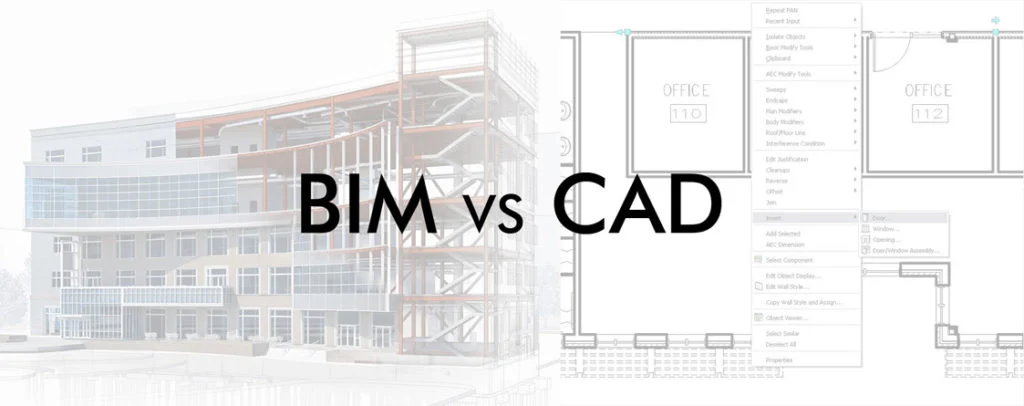
In the realm of design and construction, two major players stand tall: Building Information Modeling (BIM) and Computer-Aided Design (CAD). These software programs spark a revolution in the way projects are perceived, planned and executed. However, when it comes to BIM vs. CAD, which of those two, appears as the preferred alternative? Let's step into the details, pros, and cons of both to discover the truth.
What Is CAD?
Computer-Aided Design (CAD), is a type of software used for designing and improving it. It mostly concentrates on building 2D or 3D models of objects and structures. CAD software enables architecture, engineering and design professionals to produce precise technical sketches, blueprints, and models for various purposes, ranging from architecture to mechanical engineering.
What Is BIM?
Building Information Modelling (BIM) is a process that includes the development and maintenance of digital maps which stand for both physical and functional properties of places. It unites geometry, spatial interrelationships, geographic information systems, and quantities of building materials. BIM helps to collaborate between those who create the building from the planning stage to the day-to-day operations as the life of the building unfolds.
BIM vs. CAD: A Comparative Symphony
Aspect
Building Information Modeling (BIM)
Computer-Aided Design (CAD)
Focus
Brings data and geometry together.
A major component is geometric design and drawing drafting.
Representation
Detailed 3D Models.
2D and 3D drawings with measurements.
Collaboration
Real-Time collaboration with stakeholders and multi-disciplinary.
Requires heavy training with steep learning curve.
Comparatively easy, with an easier learning curve.
Customization
Offers flexible customization options for specific needs.
Customization is limited to a certain extend.
Costings and Timelines
Provide more accurate cost and schedule data.
Provide limited support for cost analysis.
Speed andAccuracy
Efficient workflow with high accuracy.
It focuses on precision, but sometimes it also requires manual work
Pros and Cons of BIM vs. CAD
BIM Pros :
Comprehensive Visualization: BIM can make the 3D model of the entire project, reflecting the final view of the project with better precision. Involving the stakeholders also to view the final output.
Enhanced Collaboration: With BIM, a team can collaborate with people from other disciplines, which can easily pass the information to each other.
Data Integration: BIM is developed based on non-graphical information such as cost, schedule, and sustainability which is used for the decision-making.
Efficient Lifecycle Management: BIM provides after-construction facilities to manage smart management where maintenance and building operations are streamlined.
BIM Cons:
Complexity: Using BIM requires a lot of spending money on training and maintaining software
Interoperability Challenges: Platform compatibility may cause an issue when sharing BIM models between different software.
Resource Intensive: BIM requires powerful hardware to work with and may exhaust computing capabilities, especially on extensive projects.
CAD Pros:
Precision Drafting: CAD is very useful in creating technical drawings which are more precise and up to the last digit and annotation.
Legacy Support: CAD has become an important part of the modern design industry due to its compatibility with the current industry standards and workflows.
Customization: CAD software can easily be customized according to the user's requirements. This can be done using some custom tools and templates.
Efficiency: The simple interface of the CAD can speed up the drafting process of some tasks, especially in 2
Efficiency: The simple interface of the CAD can speed up the drafting process of some tasks, especially in 2D drafting.
CAD Cons:
Limited Collaboration: CAD software mainly lacks the collaborative feature of the BIM, leading to communication gaps between project stakeholders.
Data Silos: CAD files may not contain non-graphical information such as material cost, quantities or energy performance metrics.
Static Representation: CAD files provide in-depth static representations but may lack to convey the actual view of the design like BIM.
Conclusion
There's no definitive elevation in the BIM vs. CAD harmony—it all depends on your project’s unique approach. BIM offers a friendly blend of depth and collaboration, while CAD buzzes a familiar tune of accessibility and efficiency. Consider your project’s requirements, your team’s pattern, and the long-term composition. Whether you choose BIM vs. CAD, remember: that both contribute to the future of construction and architecture.
For more information about engineering, architecture, and the building & construction sector go through the post related to the same topic on the Pinnacle IIT Blogs page.
Find out more accurately what we are going to take off in the course of our applying leading new technologies and urban design in Pinnacle IIT.
Subscribe to our YouTube Channel and blog websites to obtain all the up-to-date information relating to construction matters.
In the field of architecture, Building Information Modeling (BIM) has created a new environment based on lots of benefits offered to architects. Because of that, it has been recognized as an essential tool. Discover BIM's advantages for architectural projects, enhancing workflow, accuracy, and output quality in this essential blog post.
Building Information Modelling (BIM)
Building Information Modelling (BIM) could be said to be a turbocharger of the design processes of architecture. This software allows architects to go beyond the restrictions of traditional 2D drawings and create stunning 3D models. These models automatically generate necessary sections, elevations, and construction details, which can save a lot of work for architects.
Preserving the Essence of Design
Design Consistency: BIM ensures designers maintain fidelity to their principles from conception to completion, safeguarding the original plan throughout the process.
Collaboration: The BIM platform has allowed Architects to collaborate with other key project stakeholders such as Engineers and Contractors smoothly which has meant that the design changes are now implemented in a synchronized way hence minimising the risk of design deviations.
Real-time Updates: BIM software enables architects to promptly update design changes in the project model, swiftly resolving discrepancies and modifications.
Clash Detection: Clash detection is a benefit offered by the BIM. This helps architects to detect conflicts early between multiple building elements and correct these, thus ensuring the design integrity.
Design Visualization: BIM gives a possibility to an architect to generate a detailed 3-dimensional model of a planned design. Such visualization makes communication with clients and stakeholders easier and the final product is more similar to the original plan.
Communication: Clear and Effective
Visual Clarity: With BIM, architects can create compelling business visualizations, effectively conveying ideas to clients and stakeholders, and enhancing communication and understanding. 3D models' precision and scale enable architects to communicate spatial relationships and aesthetic values effectively. The models successfully represent their designs.
Conflict Resolution: BIM is a real game changer in engineering systems so it has become an effective tool that can remove all conflicts and overlaps in the design in advance. Timely problem identification and resolution in planning reduce rework costs and showcase proactive problem-solving, earning stakeholder appreciation.
Design Accuracy: BIM technology has a very important part to play in the design process, which remains at the highest level of accuracy. Through it, the model and document of the building come in a highly accurate way. Accurate communication enhances trust and project success, ensuring a clear understanding of tasks and considerations, and elevating overall project credibility.
Informed Decision Making using BIM
BIM integrates data from various disciplines into a unified digital model, providing architects with a holistic overview of the project. This comprehensive perspective enables informed decision-making, promotes sustainable choices, and facilitates cost savings throughout the construction process.
Error Prevention: A Key Advantage of BIM
As a safety net, it prevents different forms of errors, be it evaluation mistakes or miscommunications between specialists, customers, and organizations. It identifies any complications from different solutions, providing the relevant documents as well as, time and cost savings.
Conclusion
BIM is not just an instrument; it is a game changer for architects. It accelerates the design process, ensures communication, contributes to decision-making, and avoids mistakes. A BIM tool is one empowering architects to develop spaces that are intelligent, efficient and sustainable, forming the future of architecture.
Keep in mind that content creation is not just a way of filling empty spaces, it is about offering something of value. Hence, with Building Information Modelling, the architects can provide that value better than any time previously.
For more information about engineering, architecture, and the building & construction sector go through the post related to the same topic on the Pinnacle IIT Blogs page.
Find out more accurately what we are going to take off in the course of our applying leading new technologies and urban design in Pinnacle IIT.
Subscribe to our YouTube Channel and blog websites to obtain all the up-to-date information relating to construction matters.
Last Updated: September 2026 | Reviewed by Pinnacle IIT Academic Council | ⏱ 12 min read
The digital transition across architecture, engineering, and construction (AEC) has established BIM technology as the mandatory global standard for capital project delivery. Traditional 2D paper blueprints create spatial errors that remain undetected until concrete is cast on site. Enrolling in structured BIM courses and training in India equips engineers and designers with parametric 3D modeling skills, multidisciplinary clash resolution, and automated documentation workflows required by multinational engineering consultancies.
Quick Summary: 2026 BIM Training at a Glance
For engineering graduates and working professionals evaluating training options, here is the direct breakdown of Pinnacle IIT’s accredited programs:
Target Audience: Civil, Mechanical, and Electrical Engineers, Architects, and Diploma Holders looking to move from field supervision into design consulting.
Primary Software Stack: Autodesk Revit (Architecture, Structure, MEP), Navisworks Manage, Dynamo Scripting, AutoCAD, and Autodesk Construction Cloud.
International Standards: ISO 19650 Common Data Environments, IS 13920:2016 ductile rebar detailing, and IS 456:2000 structural concrete codes.
Placement Guarantee: Direct recruitment access to Pinnacle Infotech (3,000+ global engineers), Larsen & Toubro, Jacobs, and AtkinsRealis.
What Is Building Information Modeling (BIM)?
Building Information Modeling (BIM) is an intelligent, database-driven methodology for designing, constructing, and managing buildings and infrastructure assets. Rather than disconnected drafting lines, BIM models combine coordinated 3D geometry with engineering data, material specifications, and lifecycle parameters. This structured data model enhances project predictability, minimizes change orders, and accelerates delivery cycles.
Under international standards such as ISO 19650-1:2018, Building Information Modeling organizes project information into structured states: Work in Progress (WIP), Shared, and Published. Engineering consultancies rely on BIM to maintain a single source of truth across architecture, structural engineering, and MEPF building services.
How Professional BIM Courses Benefit Engineering Careers
Fresh engineering graduates and site supervisors frequently discover that college curriculums leave them unprepared for modern EPC projects. General site supervisor roles demand 60 hours a week on active sites for starting salaries of Rs. 18,000 to Rs. 24,000 per month. In contrast, certified BIM engineers work in corporate consulting design offices, earning starting annual packages between Rs. 4,20,000 and Rs. 6,50,000.
Efficient Design and Visualization: Architects, structural engineers, and MEP professionals build coordinated 3D models up to LOD 350 and LOD 400. Modeling complete building systems visually ensures precise spatial coordination before site work begins.
Multidisciplinary Coordination: BIM fosters direct collaboration among disparate engineering trades. Structural engineers coordinate directly with MEP modelers inside Navisworks Manage, detecting spatial clashes and service penetrations before concrete casting.
Automated Cost Estimation and Schedules: Extract dynamic quantity take-offs, Bar Bending Schedules (BBS), and bills of materials directly from the 3D model. Linking geometry to construction schedules in Primavera P6 enables 4D timeline simulation that keeps projects on budget.
BIM Course Catalog: Specialization Tracks at Pinnacle IIT
Pinnacle IIT organizes its academic training into focused cohorts tailored to your discipline background and target career milestones. The programs emphasize practical studio assignments over theoretical slide decks.
1. Pinnacle BIM Leadership Course
The Pinnacle BIM Leaders Course is a structured professional development track divided into three progressive tiers:
Tier A: Beginner Level Track (INR 72,000)
Designed for students, fresh graduates, and draughtsmen entering digital engineering. Covers fundamentals of building information systems, UI navigation, datum levels, grid layouts, wall construction, custom parametric family generation, and architectural drafting up to LOD 200.
Tier B: Intermediate Level Track (INR 78,000)
For engineers and modelers with foundational CAD skills. Focuses on advanced structural rebar detailing compliant with IS 13920 and IS 456, foundation systems, and grade slab construction details alongside HVAC duct sizing, electrical tray layouts, and plumbing gradient modeling up to LOD 350.
Tier C: Advanced Leadership Track (INR 84,000)
Targeted at aspiring BIM Coordinators and Project Leads. Encompasses multidisciplinary model federation, hard and soft clash resolution in Navisworks Manage, 4D schedule simulation in Primavera P6, Dynamo visual scripting automation, and ISO 19650 Common Data Environment governance.
2. Civil Engineering Internship Program
Graduating civil engineers often lack verified commercial project portfolios. The Civil Engineering Internship bridges academic theory and commercial consulting execution. Interns work directly on live project drawings, developing models for commercial towers, residential townships, and industrial facilities under the direct mentorship of senior engineers. For engineers seeking full structural modeling tracks, explore our dedicated BIM course for civil engineers.
Unlike online ed-tech marketing aggregators that charge over Rs. 2,00,000 for recorded video lectures, Pinnacle IIT maintains an accessible, value-driven fee structure backed by corporate delivery facilities:
Course Track
Duration
Total Tuition Fee (INR)
Monthly EMI Option
Target Career Designation
Beginners Level
8 Weeks
INR 72,000
From Rs. 6,000 / month
Junior BIM Modeler (LOD 200)
Intermediate Level
12 Weeks
INR 78,000
From Rs. 6,500 / month
Discipline BIM Engineer (LOD 350)
Advanced Leadership Track
16 Weeks
INR 84,000
From Rs. 7,000 / month
BIM Coordinator / Project Lead
Software Tools & Engineering Deliverables Covered
Modern consultancies require proficiency across an interconnected software ecosystem. The table below outlines the core tools and practical engineering deliverables taught across our programs:
Algorithmic parameter population, automated sheet generation, rebar distribution scripting
Custom .DYN automation scripts for batch workflows
Autodesk Construction Cloud
CDE & ISO 19650
Cloud collaboration, model publishing, design review markups, issue tracking dashboards
ISO 19650 compliant shared data repository
Why Choose Pinnacle IIT Over Generic CAD Centers
When selecting a training institute, engineering students face three distinct provider options: generic local computer centers, high-cost online portals, and specialized engineering finishing schools. The benchmark comparison table below illustrates why Pinnacle IIT delivers superior industry outcomes:
Evaluation Criteria
Pinnacle IIT
Local Franchise CAD Centers
Ed-Tech Aggregators
Industry Lineage
Direct corporate lineage to Pinnacle Infotech (3,000+ global engineers)
Franchise operators without active engineering consulting operations
Marketing companies hiring freelance instructors
Project Datasets
Live international airports, hospitals, and high-rise commercial structures
Basic sample tutorials and textbook 2D floor plans
Standardized synthetic assignments
Direct Placement
Direct campus recruitment drives into Pinnacle Infotech, L&T, Jacobs, AtkinsRealis
Unverified job portal links and local noticeboards
Third-party placement referrals with no in-house hiring
Fee Value
Rs. 72K to 84K with 0% interest EMI options
Rs. 40K to 80K with variable quality per branch
Rs. 1,75,000 to Rs. 2,75,000
BIM Career Pathways & Industry Salary Benchmarks (2026)
Compensation in Building Information Modeling increases rapidly as engineers transition from raw modeling into multidisciplinary coordination and information management:
Experience Level
Job Designation
Primary Responsibilities
Average Salary (India)
Average Salary (Gulf / UAE)
0–2 Years
Junior BIM Modeler
Parametric modeling, family generation, drawing extraction
Rs. 4,20,000 – Rs. 6,50,000
AED 72,000 – AED 96,000
3–5 Years
Senior BIM Engineer
Discipline lead, 3D rebar detailing, clash resolution matrices
Rs. 7,50,000 – Rs. 11,00,000
AED 110,000 – AED 144,000
6–8 Years
BIM Coordinator
Federated model reviews, consultant coordination, 4D simulation
Rs. 12,00,000 – Rs. 18,50,000
AED 150,000 – AED 210,000
9+ Years
BIM Manager / Director
BEP authoring, ISO 19650 protocols, enterprise CDE implementation
Rs. 22,00,000 – Rs. 35,00,000+
AED 240,000 – AED 380,000+
Explore upcoming cohort schedules and student placement verification records on our official BIM courses with placement portal.
Frequently Asked Questions (FAQs)
1. What is covered in professional BIM courses and training in India?
Professional BIM training covers parametric 3D modeling in Autodesk Revit across Architectural, Structural, and MEP disciplines, multidisciplinary clash coordination in Navisworks Manage, 4D construction sequencing, automated quantity take-offs, and project governance under ISO 19650 standards.
2. What are the eligibility criteria for joining Pinnacle IIT’s BIM courses?
Candidates holding a diploma or degree (B.Tech, B.E., B.Arch, M.Tech) in Civil, Mechanical, Electrical Engineering, or Architecture are eligible. Working site engineers and draughtsmen seeking transition into digital engineering consulting also qualify.
3. What is the fee structure for BIM training at Pinnacle IIT?
Pinnacle IIT structures fees transparently: Beginners Level is INR 72,000, Intermediate Level is INR 78,000, and the Advanced Leadership Track is INR 84,000. Flexible no-cost EMI options are available.
4. How does Pinnacle IIT provide placement assistance to students?
Pinnacle IIT operates a dedicated placement cell with direct corporate recruitment pipelines. Trainees participate in interview rounds with Pinnacle Infotech, Larsen & Toubro, AtkinsRealis, Jacobs, and overseas engineering consultancies upon capstone project approval.
5. Are the classes conducted online or classroom-based?
Pinnacle IIT provides dual modes: interactive live online studio sessions with screen sharing, as well as offline studio labs at Jaipur and Durgapur equipped with enterprise CAD workstations.
6. Which software tools are taught during the BIM training program?
Trainees master Autodesk Revit (Architecture, Structure, MEP), Navisworks Manage, Dynamo Visual Scripting, AutoCAD, and Autodesk Construction Cloud (ACC).
7. What credential will I receive after completing the course?
Graduates earn verified certificates from Pinnacle IIT along with credentials from an Autodesk Authorized Training Center (ATC).
8. How does BIM training differ for civil engineers compared to architects?
Architectural BIM focuses on spatial layouts, facades, and interior finishes. Civil BIM focuses on structural framing, 3D rebar detailing under IS 13920, foundation modeling, Bar Bending Schedules (BBS), and land grading.
9. What is the duration of the BIM training program?
Depending on the chosen track, course duration ranges between 8 and 16 weeks of practical studio instruction, involving hands-on project modeling and portfolio development.
10. Is there an internship option available for fresh civil engineering graduates?
Yes, Pinnacle IIT offers a specialized Civil Engineering Internship program where students work directly on live project drawings, developing industrial modeling competencies before full-time corporate hiring.
Related Engineering & BIM Resources
For more information about engineering, architecture, and the building & construction sector, explore the posts on the Pinnacle IIT Blogs page.
Find out more about applying leading new technologies and modern engineering design at Pinnacle IIT.
Subscribe to our YouTube Channel and blog to stay informed on the latest construction and BIM developments.
In our living world where natural disasters are non-stop and can happen anytime, building such structures that are earthquake, tornado, flood, or hurricane resistant is a must. Earthquakes may be considered natural destructors that have devastating effects on buildings and human lives. As architects and engineers, we have to provide the necessary design and construction of earthquake-resistant buildings, which balance the protection and stability of people.
How Earthquakes Impact Buildings
The fundamentals of earthquake-resistant buildings need to be understood before we get on with the detailed ones. If an earthquake occurs then it squeezes the earth and the waves propagate in all directions indefinitely. Buildings resist vertical forces but are vulnerable to lateral earthquake forces.
This shear force affects all the vertical structures, such as walls, floors, columns, beams and the fixtures in between. The differential movement between the support and elevation of the building might lead to its collapse and structural failure. And because of that, we need to construct earthquake-resistant buildings to avoid this risk.
Methods for Constructing Earthquake-Resistant Buildings
To create earthquake-resistant buildings, engineers employ various strategies to reinforce structures and counteract seismic forces. Let’s explore some of these methods:
1. Flexible Foundations:
Base Isolation: Envision the elevation of a building's foundation beyond the Earth's surface—base isolation is exactly that! Flexible materials or bearings have been used to detach the building from the foundation. This enables the building to move on its own, not affected by the ground movement during an earthquake. This isolates the building from the shaking earth, minimizing the energy impact on the structure.
Purpose: Base isolation separates the superstructure, preventing seismic force transmission to the foundation, and maintaining structural integrity.
2. Damping Systems:
Energy Absorption: Damping technology is all about introducing the energy-absorbing elements that constitute a building structure. The devices absorb the energy effectively and hinder sustained movement.
Types of Dampers:
Tuned Mass Dampers: They are colossal pendulum-like systems that compensate for the lateral (wind) motion.
Viscous Dampers: Viscous fluid-based devices which are filled with fluid absorb energy through viscous motion resisting.
Friction Dampers: The heat from friction occurs due to the conversion of kinetic energy into thermal.
Advantages: Dampers are essential for security and occupant safety.
3. Vibration Deflection:
Flexible Elements: Engineers design buildings with elements that absorb and dissipate energy through structural dynamic analysis methods. As an illustration, seismic currents that make tall structures sway back may be controlled using tuned mass dampers sited at the top of buildings.
Examples: Tuned mass dampers, tuned liquid column dampers, and pendulum systems.
4. Shear Walls and Cross Braces:
Shear Walls: Vertical elements within a building that resist lateral forces. These walls distribute seismic loads and prevent excessive sway.
Cross Braces: Diagonal members that enhance stability. They form an “X” or “K” pattern and provide lateral stiffness.
5. Diaphragms:
Horizontal Components: Diaphragms are floors, roofs, and other horizontal construction elements. They spread seismic forces equally through the building structure.
Importance: Properly designed diaphragms reduce the possibility of localized failure and guarantee that the load is spread evenly.
6. Moment-Resisting Frames:
Purpose: These frames allow a building to flex and absorb energy during an earthquake.
Components:
Beams: Beams connected to columns with special joints allow controlled movement.
Columns: Columns resist both vertical and lateral forces.
Advantages: Moment-resisting frames enhance overall building resilience.
Earthquake-Resistant Buildings Materials
Let’s delve deeper into the materials used for earthquake-resistant buildings:
1. Reinforced Concrete:
Composition: Reinforced concrete consists of two primary components: concrete and steel reinforcement.
How It Works: Concrete provides compressive strength, while steel reinforcement (usually in the form of bars or mesh) adds tensile strength. When combined, they create a material that can withstand both compression and tension forces.
Applications:
Columns: Reinforced concrete columns carry the weight of the building and laterally resist loads when there is an earthquake.
Beams: Beams transfer loads from floors and roofs to columns. They play a crucial role in distributing seismic forces.
Shear Walls: The vertical concrete-reinforced walls behave as shear-resistant elements, and so keep the lateral movement of the structure in check.
Advantages: Reinforced concrete is readily available, and cost-effective, and it can be used in any architectural design.
2. Steel:
Ductility: Steel, as a material, is fairly ductile and will experience a large deformation before it breaks. These properties enable it to dissipate earthquake energy without destructive collapse.
Structural Components:
Frames: Bending-resistant frames (for example, moment-resisting frames) provide flexibility and tolerance. They hold the frame in place and enable controlled motion should there be an earthquake.
Braces: Braces made of diagonal steel reinforce lateral load bearing. They acquire and redistribute seismic forces.
Applications:
High-Rise Buildings: Steel-framed high-rises are common in earthquake-prone regions.
Bridges: In addition, steel bridges implement seismic design aspects to accommodate ground shaking.
Advantages: Steel structures are a lightweight, durable, and adaptable option for off-site production.
3. Timber:
Modern Timber Techniques: Popular choices include cross-laminated timber (CLT) and glued laminated timber (glulam).
Strength and Flexibility:
CLT: As sheets of veneers are crossed and adhered, timber boards create layers. The CLT is required to provide enough strength and resilience.
Glulam: Glued laminated timber, made out from various layers of timber glued together, is part of the laminated products group. It is ideal for structures that require extreme load-bearing capacity.
Applications:
Mid-Rise Buildings: The Replica of timber buildings can be constructed up to several stories high including earthquake-resistant buildings.
Seismic Joints: Properly designed timber joints allow for movement without compromising stability.
Advantages: Timber is one of the most responsible materials around, since it is renewable, sustainable, and produces fewer greenhouse gas emissions.
Conclusion
It is necessary to remember that the procedure of producing earthquake-resistant buildings is not a matter of compliance but rather about saving lives and communities. Through innovative designs and the utilization of resilient materials, it is possible to build structures which can remain still while nature is roaring.
For more information about engineering, architecture, and the building & construction sector go through the post related to the same topic on the Pinnacle IIT Blogs page.
Find out more specifically what you can expect to see when we present cutting-edge infrastructure and urban design methods at Pinnacle IIT.
Subscribe to our YouTube Channel and blog websites to obtain all the up-to-date information relating to construction matters.
In the fast-paced world of AEC, Building Information Modeling (BIM) has claimed pole position. BIM is not only a recent fad; it is a transformational approach which optimizes collaboration, efficiency, and decision-making among the players throughout the project cycle. This post will focus on the ins and outs of integrating BIM technology into the design process to help you efficiently exploit its full potential.
What Is BIM?
Before dealing with integration tactics, we will take a brief look at what BIM is. BIM is a digital model that represents the physical and functional features of a building. It exceeds the 3D modelling by integrating data about materials, components and systems. Consider it as a global approach that integrates geometry with space relations and data.
What is Integrating BIM into the Design Process?
Collaboration Amplified:
BIM promotes the cooperation of architects, engineers, contractors, and other key players. In a collaborative environment, all parties are working on the same model, eliminating silos in communication and making communication more efficient.
Imagine a seamless exchange of information between disciplines, leading to better-informed decisions.
Efficiency Unleashed:
BIM streamlines design iterations, clash detection, and revisions. Changes made in one view automatically propagate throughout the model.
Say goodbye to manual update processes and welcome, efficiency gains.
Data-Driven Decisions:
BIM provides a treasure trove of data. From material quantities to energy performance, you can make informed decisions based on real-time information.
Architects can explore design alternatives, considering cost implications and sustainability goals.
Steps of Integrating BIM into Your Design Workflow
1. Start Early
Pre-Design Phase:
Begin BIM integration during the pre-design phase. Gather project requirements, understand client goals, and define the scope.
Involve all stakeholders—architects, engineers, and facility managers—from the get-go.
2. Choose the Right BIM Software
Evaluate Options:
Research BIM software options. Consider factors like ease of use, interoperability, and scalability.
Popular choices include Autodesk Revit, ArchiCAD, and Bentley MicroStation.
3. Develop a BIM Execution Plan (BEP)
Plan Ahead:
Create a BEP that outlines BIM processes, responsibilities, and milestones.
Develop your design directly in the BIM model. Explore spatial relationships and visualize the building.
Leverage parametric modelling for flexibility.
6. Data Integration
Link Data:
Integrate specifications, cost data, and schedules into the BIM model.
Use shared parameters for consistency.
7. Visualize and Communicate
Renderings and Walkthroughs:
Generate realistic renderings and walkthroughs to communicate design intent.
Engage clients and stakeholders effectively.
Conclusion
In summation, the integration of BIM changes teamwork, advances effectiveness, and facilitates data-driven decisions in architecture, engineering, and construction. At the start, pick the best software, plan carefully, encourage cooperation, design in 3D, combine data sources and produce effective visualization to succeed. Thanks to the BIM driving innovation, precision and sustainability the industry marches to the future with confidence.
For more information about engineering, architecture, and the building & construction sector go through the post related to the same topic on the Pinnacle IIT Blogs page.
Find out more specifically what you can expect to see when we present cutting-edge infrastructure and urban design methods at Pinnacle IIT.
Subscribe to our YouTube Channel and blog websites to obtain all the up-to-date information relating to construction matters.