Author: Happy Pachani

  • Understanding SD, DD, and CD in the AEC World

    Understanding SD, DD, and CD in the AEC World

    In the dynamic world of architecture, engineering, and construction (AEC), professionals use various terminologies and acronyms to describe different stages of a project. Among these, SD, DD, and CD hold significant importance. Let’s delve into what these terms mean and their benefits in the AEC industry.

    What is Schematic Design (SD)?

    Schematic design, also known as SD, is the first phase in the architectural design process. In this stage, architects and designers work together with clients to find out their needs, vision, and objectives for the project. The emphasis is on drafting the initial sketches and conceptual drawings that capture the main idea of the project.

    SD enables architects to create different design options, concepts, and ideas, thus helping clients see the project's aesthetics and layout. In this stage, design problems and opportunities are identified. This helps the client make wise decisions. These decisions are based on the project scope and cost estimates. Architects, designers, and consultants can find and solve design issues. This results in fewer costly modifications in later stages. The SD stage promotes close collaboration between teams. These teams include architects and clients. This collaboration ensures designs align with the client’s vision and requirements.

    The SD phase typically includes:

    • At first, having the floor plans, elevations, and sections is a way to have a rough outline of the whole project.
    • The building's size and shape are being used as a basis for identification.
    • The first task of that stage is to find out what the primary building systems (structural, mechanical, electrical, and plumbing) are.
    • Calculating the project’s cost from the conceptual design is merely a rough estimate. It doesn’t fully depict the future events in the construction.

    The primary purpose of the SD phase is to fulfill the client’s vision and program requirements. It’s crucial to obtain the client’s approval before moving on to the next stage.

    SD (Schematic Design)
    Image Source: Moss Architecture

    Benefits of Schematic Design

    The schematic design phase is the basis of any AEC project. It provides several benefits:

    • Client Engagement: SD enables architects to collaborate with clients so that the project will follow their vision and requirements.
    • Problem Identification: In the beginning, we detect potential design challenges and opportunities, and we solve them on time.
    • Cost Estimation: Initial cost estimates are derived from the project’s scope. This helps clients make informed decisions. in turn, assists the clients in making the right decisions.
    • Design Exploration: Architects can experiment with various design ideas and concepts, thus creating a space for creativity and innovation.

    What is Design Development (DD)?

    The Design Development stage, known as DD, follows the Schematic Design phase. In this phase, the design team refines the initial sketches. They create a more precise design based on the SD concepts.

    During design development, architects collaborate with various stakeholders. These include engineers and contractors. They work together to address structural, mechanical, and electrical issues. The main goal is to create accurate drawings and 3D models. They also select materials that align with the project’s functional needs and budget.

    The DD phase typically includes:

    • The first step in the design process is the development of detailed floor plans, elevations, and sections.
    • Outlining the materials and finishes that are to be employed
    • The different building systems (structural, mechanical, electrical, and plumbing) need to be coordinated.
    • The cost estimate of the project was refined based on the more detailed design.

    The main goal of the DD phase is to ensure that we completely coordinate the design and all stakeholders agree before moving on to the construction documents phase.

    Design Development
    Image Source: Moss Architecture

    Benefits of Design Documentation

    The Design Development phase modifies the ideas that were made in the SD phase. It offers several advantages:

    • Detailed Design: DD is mainly concerned with making the drawings, 3D models, and the choice of materials that meet the requirements of function and budget.
    • Collaboration: Architects, engineers, and contractors work together to solve the problems of the structure, the machinery, and the electricity.
    • Cost and Time Savings: Studies show that the use of professional drawing services during the DD phase can lead to up to 15% time savings and 10% cost savings on building projects.

    What is construction documentation (CD)?

    Construction documentation (CD) is the phase where the finalized design is turned into detailed instructions for the construction team. It contains in-depth drawings, detailed specifications, and technical documents that direct the construction process; thus, the construction becomes accurate and the design vision is followed. This stage is essential for a successful and fast construction process.

    The CD phase typically includes:

    • Floor plans, elevations, sections, and details are the essential elements that have to be provided in the building design of a project.
    • It will define the different materials, finishes, and equipment to be used.
    • Giving a comprehensive description of the building systems (structural, mechanical, electrical, and plumbing) is the key to conveying all the necessary information to authorities.
    • Its detailed specifications outline the materials and workmanship for construction.

    The main goal of the CD phase is to present a complete and written set of documents that stakeholders can use for bidding, permitting, and construction.

    Construction Documentation
    Image Source: Moss Architecture

    Benefits of Construction Documentation

    The construction documentation phase is the most important part of any AEC project to be realized. It has several benefits:

    • Detailed Documentation: CD offers complete drawings, specifications, and technical documents, which are a must for the construction.
    • Clear Communication: The documents generated in the CD phase are very clear and detailed and will help the construction team build without any mistakes or confusion.
    • Regulatory Compliance: The CD phase makes sure that all designs are in line with the local building codes and regulations.

    The Importance of SD, DD, and CD in the AEC Industry

     Let’s delve deeper into the importance of each phase (SD, DD, and CD) in the AEC industry:

    Schematic Design (SD)

    During the schematic design phase, designers create the project's general outlines. The collaboration needs to be successful, as it includes discussions between architects, engineers, and clients to get a clear idea of the project's requirements and objectives. This phase helps in minimizing errors because it enables the detection and solution of possible design problems at the beginning. It also helps with expense management by creating preliminary cost estimates based on the project's scope, allowing clients to make informed decisions.

    Design Development (DD)

    Design development (DD) is the phase when the schematic designs are more refined and detailed. This phase is crucial for collaboration since it includes different parties, such as engineers and contractors, to solve structural, mechanical, and electrical problems. The DD phase is beneficial for mistake reduction as it enables the removal of design and structural errors before construction starts. Besides, it also helps in expense control because it gives a more precise estimate of the project cost through the detailed design.

    Construction Documentation (CD)

    Construction documentation (CD) is the last stage before construction starts. Effective collaboration is essential, as it provides the construction team with precise and detailed instructions, ensuring everyone understands their expectations. The CD phase reduces mistakes and the likelihood of construction errors by providing detailed information. It also ensures cost savings by ensuring the project’s completion according to the finalized design and within the estimated budget.

    Conclusion

    Anyone involved in the AEC industry must understand the roles and benefits of SD, DD, and CD. These stages not only help in the successful execution of projects but also ensure effective collaboration among various stakeholders. By understanding these stages, one can ensure a smooth and efficient construction process, leading to successful project completion.

    Remember, in the AEC world, SD means schematic design, DD means design development, and CD means construction documents. Each of these stages plays a vital role in the successful completion of a construction project. So, the next time you come across these acronyms, you’ll know exactly what they mean and their significance in the AEC industry.


    For more information about engineering, architecture, and the building & construction sector, go through the posts related to the same topic on the Pinnacle IIT Blogs page.

    Find out more accurately what we are going to take off in the course of applying leading new technologies and urban design at Pinnacle IIT.

    Subscribe to our YouTube channel and blog websites to obtain all the up-to-date information relating to construction matters.

  • Construction Drawings vs. Shop Drawings: What is the Main Difference?

    Construction Drawings vs. Shop Drawings: What is the Main Difference?

    When it comes to construction projects, two types of drawings are crucial for the successful completion of any project: Construction Drawings and Shop Drawings. These drawings, while serving different purposes, are both integral to the construction process. This blog post will delve into the main differences between these two types of drawings.

    Understanding Construction Drawings

    Construction drawings, which can also be called plans or blueprints, are all and everything of any construction project. They are made by architects and engineers, who are paid by property owners, upon request. The sketches illustrate the general layout of the project and its appearance. They reflect the course of the work in progress as well as most likely its outcome. They ensure consideration of everything, including the final use of the structure, all the features it must have, its appearance, performance, and a detailed view of it.

    Understanding Shop Drawings

    Shop drawings are the detailed blueprints created by contractors or subcontractors for a construction project. They give extensive instructions on manufacturing or mounting different parts, systems, or polygons. They are designed to match a situation on time, so they can be adjusted perfectly as required. This focus on the details eliminates costly mistakes and delays, making shop drawings an important tool in construction. They bridge the gap between construction drawings' design intent and actual building construction. They transform the language of architects and engineers into a form in which builders and fabricators can execute it.

    Main Differences Between Construction Drawings and Shop Drawings

    Here’s a detailed comparison between construction drawings and shop drawings:

    Construction DrawingsShop Drawings
    DefinitionThese are comprehensive plans that provide a bird’s eye view of the entire project.These are detailed guides for the fabrication or installation of specific components.
    CreatorsCreated by architects or engineers.Produced by contractors or subcontractors.
    PurposeThey depict the overall design, layout, and appearance of the project.They provide detailed instructions for creating specific components or systems.
    DetailsThey include details about the structure, materials, and systems of the project.They focus on the details of individual components or systems, including their fabrication and installation.
    UsageUsed to understand the overall project and to obtain building permits.Used for manufacturing or installing specific components or systems.
    TimingCreated before the construction work begins.Developed after the construction contract has been signed.
    AccuracyMay contain errors or ambiguities as they are pre-construction.Provide accurate dimensions and assembly details from a professional engineer.
    Detail LevelPrepared during design phases and refined before construction.Produced after contracts are awarded and during the construction phase.
    ContentInclude floor plans, elevations, sections, schedules, and finishes.Focus on specific elements like structural steel, mechanical systems, etc.

    Conclusion

    In summary, while construction drawings provide the overall plan for the building, shop drawings offer a zoomed-in view of specific elements, providing detailed guidance on how to manufacture or install specific parts. Both types of drawings are essential for the successful completion of any construction project.

    Frequently Asked Questions

    1. What is a construction drawing?

    The construction drawing, commonly called a blueprint, is the detailed plan of the construction project. It is a summary of the whole project which includes the design, layout and appearance, giving a general picture of the project structure. Such sketches play a key role in the visualization of the architect’s or engineer’s vision for the upcoming project and they also help in aligning the construction team with the common goal and specifications. They specify the materials to be used, govern the construction process, determine the location of structures, and oversee the overall design of the structure.

    2. What is a shop drawing?

    Contractors and subcontractors alike make detailed drawings known as shop drawings. It is a work plan that defines adding or installing specific components of the project. These drawings account for real site conditions to ensure the correct construction. In this case, they act as a significant instrument for the successful and accurate performance of the tasks.

    3. Why are construction drawings important?

    Construction drawings are the key to the successful project implementation. They emulate the actual structure, reflect materials and dimensions, and provide an orderly and precise construction process. Architects use drawings to communicate design concepts to the construction team.

    4. Why are shop drawings important?

    Shop drawings are significant in that they provide an accurate picture of what needs to be fabricated and ensure the construction is on point. They give specific instructions for particular elements, thus facilitating smooth project running.

    5. What is the main difference between construction drawings and shop drawings?

    The main difference between construction drawings and shop drawings is that construction drawings depict the overall intent and outcome of the work taking place, while shop drawings provide detailed instructions for creating specific components, systems, or structures within a project.

    Remember, both types of drawings are essential for the successful completion of any construction project. They serve different purpose but they complement each other to ensure that we complete the project accurately and efficiently. Understanding the differences between them can help streamline the construction process and avoid potential misunderstandings or conflicts.


    For more information about engineering, architecture, and the building & construction sector, go through the posts related to the same topic on the Pinnacle IIT Blogs page.

    Find out more accurately what we are going to take off in the course of applying leading new technologies and urban design at Pinnacle IIT.

    Subscribe to our YouTube channel and blog websites to obtain all the up-to-date information relating to construction matters.

  • Why Revit Software the Best Fit for Rebar Modeling?

    Why Revit Software the Best Fit for Rebar Modeling?

    In the field of construction and structural design, one must pay attention to efficiency, accuracy, and success rate. Advanced software applications are the key to success in construction projects when it comes to rebar modeling. The multitude of available programs places Revit software at the top, with its unique features well suited for undertaking the crucial task of rebar modeling.

    Understanding the Importance of Rebar Modeling

    Before exploring why Revit software is the most suitable option for Rebar Modeling, it is important to understand the implications of this procedure. Rebar, also known as reinforcement bar, reinforces concrete structures, increasing the strength and longevity of buildings, bridges, and other forms of infrastructure. Precise rebar modelling is crucial to ensuring structural integrity, safety, and compliance with design specifications and building codes.

    Understanding Revit Software

    Revit is Building Information Modeling (BIM) software that allows architects, engineers, and construction professionals to model shapes, structures, and systems in 3D with parametric accuracy, precision, and ease. It streamlines project management with instant revisions to plans, elevations, schedules, sections, and 3D visualizations.

    The Power of Revit Software in Rebar Modeling

    1. Precision and Accuracy

    Revit is a tool for making detailed 3D models. It’s known for its precision and accuracy. The software uses parametric modeling. This means models change as you adjust parameters. These changes happen in real-time. This feature is vital in rebar modeling. In this field, every millimeter is important. Revit’s precision makes it a top choice for professionals. It ensures that the models are accurate and up-to-date. This is why Revit is preferred for rebar modeling.

    2. Streamlined Project Management

    Revit is known for its efficient project management. It instantly updates all related documents when a model changes. This includes plans, elevations, and schedules. If a rebar model changes, these documents are automatically updated. This feature is a time-saver. It also reduces the risk of errors in project documentation. Inconsistencies are also minimized. This makes project management with Revit smooth and streamlined. This efficiency is one of the reasons why professionals prefer Revit.

    3. Multidisciplinary Collaboration

    Revit promotes efficient teamwork across disciplines. Architects, engineers, and construction professionals can collaborate on the same model. This makes coordination easier. In rebar modeling, this is particularly beneficial. The expertise of different professionals is often needed. Revit’s collaborative features make this process smoother. It allows for effective input from all team members. This is why Revit is a preferred tool for rebar modeling.

    4. Advanced Rebar Detailing Tools

    Revit is equipped with advanced rebar detailing tools. These tools enable the creation of complex rebar shapes. They also allow for various configurations. This makes it possible to model rebar for complex structures. Even the most intricate concrete structures can be modelled. This is due to the advanced tools that Revit provides. These tools make Revit software a top choice for professionals in the field.

    5. Analysis and Optimization

    Revit's analytical tools enable users to perform structural analysis and optimization of rebar designs, ensuring that the final structure meets performance requirements and safety standards. By simulating various scenarios and evaluating different design options, users can make informed decisions that enhance the efficiency and effectiveness of the rebar modeling process.

    6. Automated Detailing

    Revit comes with automated detailing tools. These tools simplify the creation of detailed rebar drawings. They also help in making schedules and documentation. The automation of repetitive tasks is a key feature. This allows users to focus more on creative design. Problem-solving also becomes a priority over manual drafting. This is why Revit is a preferred tool for professionals in the field.

    The Benefits of Using Revit for Rebar Modeling

    1. Improved Efficiency

    The automation of many tasks is among the advantages of Revit in the field of rebar modeling. When any changes are made to the model, it updates all the related documents and drawings at once. This allows for automatic updates, bypassing the necessity for manual corrections, which saves a lot of time. It also diminishes the prevalence of errors involved with manual updates, which may result in more precise and trustworthy models.

    2. Enhanced Collaboration

    Revit will allow the different project groups to work together. Its multidisciplinary nature allows for collaboration between architects, engineers, and building professionals on the same 3D model. This is most evident in rebar modeling, where the contribution of different professionals is mostly necessary for creating efficient and realistic models. Thanks to Revit, team members can do the necessary sharing and updating of models, thus raising the level of cooperation and efficiency.

    3. Greater Accuracy

    Accuracy is paramount in rebar modeling, and Revit delivers it. Revit’s parametric modeling capabilities ensure that rebar models are as accurate as possible. As we adjust parameters, the model updates in real time, ensuring that it captures every detail accurately. This level of precision is crucial in rebar modeling, where every millimeter can impact the integrity and safety of the structure.

    4. Advanced Tools

    Revit comes equipped with advanced rebar detailing tools that allow for the creation of complex rebar shapes and configurations. These tools make it possible to model rebar for even the most complex concrete structures. Revit's advanced tools enable you to create accurate and detailed rebar models, whether you're working on a simple slab or a complex high-rise building. This capability makes Revit a powerful tool for rebar modeling.

    Conclusion

    Revit software is a powerful tool for Rebar Modeling. Its precision, efficiency, collaborative capabilities, and advanced tools make it the best fit for this task. Whether you’re an architect, engineer, or construction professional, using Revit for Rebar Modeling can help you create more accurate models, work more efficiently, and collaborate more effectively with your team.


    For more information about engineering, architecture, and the building & construction sector, go through the posts related to the same topic on the Pinnacle IIT Blogs page.

    Find out more accurately what we are going to take off in the course of applying leading new technologies and urban design at Pinnacle IIT.

    Subscribe to our YouTube channel and blog websites to obtain all the up-to-date information relating to construction matters.

  • BIM Interview Questions & Answers

    BIM Interview Questions & Answers

    Preparing for BIM interview questions requires a structured grasp of digital project delivery, clash resolution matrices, and ISO 19650 information governance. Whether interviewing for a BIM Modeler, Coordinator, or Information Manager role, hiring panels evaluate practical problem-solving across Autodesk Revit, Navisworks, and Common Data Environments (CDE).

    Key Takeaways (Quick Overview)

    • Core Technical Themes: LOD specifications (100–500), ISO 19650 information exchange, federated multidisciplinary clash detection, and parametric family creation.
    • Model Quality Control: Strategies for file maintenance, shared coordinates, audit cleaning, warning resolution, and workset administration.
    • Clash Classification: Technical distinction between hard clashes (physical geometric intersections), soft clashes (clearance buffers), and workflow workflow 4D clashes.
    • Professional BIM Placement: Master end-to-end interview prep and live project portfolios in the BIM Course for Civil Engineers at Pinnacle IIT.

    Editorial Note: Last technical audit conducted in October 2026 by Harsheel Purohit, Corporate Placement Director & Senior BIM Architect. Formulated from live interview assessments across top international AECO consultancies.

    Target Audience & Practical Use Case: Designed for civil engineers, architects, mechanical modelers, and BIM candidates interviewing with global engineering consultancies. Use this categorized technical question bank to clear technical viva rounds and live modeling tests.

    Core Concepts & Professional Background (Section 0)

    Direct Answer: BIM (Building Information Modeling) is an intelligent, 3D model-based digital process that gives architecture, engineering, and construction (AECO) professionals the insight and tools to plan, design, construct, coordinate, and manage building infrastructure collaboratively throughout an asset’s entire lifecycle under ISO 19650 standards.

    • Q1: How do you introduce your BIM engineering background? State your specific core software proficiencies (Revit, Navisworks, Dynamo), discipline focus (Structural, MEP, or Architectural), and mention live project experience delivering LOD 350 coordinated models under ISO 19650 protocols.
    • Q2: What is the difference between 3D CAD and BIM? 3D CAD represents passive geometric lines, meshes, and surfaces, whereas BIM embeds parametric object data (materials, thermal U-values, structural load capacities, cost codes, and manufacturer lifecycle data) directly inside intelligent 3D assemblies.

    BIM Modeling Workflows & Quality Assurance (Section 1)

    Direct Answer: Quality assurance in BIM models requires establishing project coordinate basepoints, maintaining workset segregation, auditing family file sizes, tracking Revit warnings below 50, and verifying geometric tolerances against BIM Execution Plan (BEP) clash resolution rules before publishing shared NWC files.

    • Q3: How do you ensure data accuracy in large models? Enforce shared parameter text files, execute bi-weekly model audit cleanups (purging unused types and CAD imports), monitor project file size thresholds (<300 MB per central file), and inspect system connectivity.
    • Q4: What are the BIM Dimensions (3D to 7D)? 3D is Parametric Geometry; 4D is Time & Scheduling (TimeLiner); 5D is Cost Estimation; 6D is Sustainability & Energy Analysis; 7D is Facility Asset Management & COBie Handover.

    Software Ecosystem, LOD Levels & Industry Standards (Section 2)

    Direct Answer: The modern BIM software ecosystem integrates Autodesk Revit (primary multidisciplinary authoring), Navisworks Manage (spatial clash coordination), Solibri (rule-based model checking), and BIM 360/Autodesk Construction Cloud (Common Data Environment), aligned with BIMForum Level of Development (LOD 100 to 500) and ISO 19650 information workflows.

    • Q5: Can you explain Level of Development (LOD 100 to 500)? LOD 100 is conceptual massing; LOD 200 is generic systems; LOD 300 is precise design geometry; LOD 350 includes trade coordination interfaces; LOD 400 is fabrication detailing; LOD 500 is field-verified as-built.
    • Q6: What is the role of a Common Data Environment (CDE)? Under ISO 19650, a CDE establishes four distinct information states—Work in Progress (WIP), Shared, Published, and Archived—ensuring strict single-source-of-truth document control across multidisciplinary project teams.

    Frequently Asked Questions on BIM Interviews (Section 3)

    Direct Answer: Common technical interview questions test clash detection terminology (hard vs soft clashes), BIM Execution Plan (BEP) authoring, coordinate setup (Shared vs Project Base Point), and parametric family creation workflows (Type vs Instance parameters).

    • What is the difference between a hard clash and a soft clash? A hard clash occurs when two geometric objects occupy the same physical space (e.g., pipe intersecting a concrete beam). A soft clash occurs when an element violates a required clearance, insulation buffer, or maintenance access corridor.
    • What is the purpose of a BIM Execution Plan (BEP)? Formulated in response to Employer’s Information Requirements (EIR), the BEP defines software versions, LOD matrices, file naming rules, clash tolerances, and project milestone deliverables.

    Conclusion & Practical Interview Preparation Checklist (Section 4)

    Direct Answer: To crack a technical BIM interview, prepare a digital portfolio showcasing 3D federated models, demonstrate Navisworks clash reports, show custom parametric Revit families, and articulate hands-on familiarity with ISO 19650 information exchange protocols.

    Prepare for Top Corporate BIM Interviews with Industry Mentors

    Build production-level portfolio projects, master Navisworks clash matrices, and receive 100% placement support at Pinnacle IIT.

    Download Course Brochure & View Schedule →

  • What Are The Main Concepts Of The BIM? Explained Here

    What Are The Main Concepts Of The BIM? Explained Here

    Building Information Modeling (BIM) is a revolutionary concept that has transformed the construction industry. It’s a digital representation of a building’s physical and functional characteristics, including its geometry, spatial relationships, and building components. But what are the main concepts of BIM? Let’s delve into it.

    What is BIM?

    Building Information Modeling (BIM) is a revolutionary process in the construction sector. It’s a digital depiction of a building’s physical and functional traits. This digital model helps streamline design, construction, and operation processes. Importantly, BIM is not just a single piece of technology or software. It’s a comprehensive process. This process covers the entire lifecycle of a building. Therefore, BIM serves as a foundation for decision-making in the construction industry.

    Main Concepts of Building Information Modeling

    We now have a basic understanding of BIM. Then, we’ll delve into its core principles to understand how they drive this transformative process.

    BIM: A Comprehensive Process

    Building Information Modeling is a sequential process that covers the whole lifespan of a building. It is more than just technical or software. It’s a comprehensive approach. This approach starts with the design of a building. It continues during the construction phase. Interestingly, it doesn’t end with the completion of the building. It extends into the operation and maintenance phases. This mechanism promotes collaborative work. It enables timely scheduling. It also encourages the judicious use of resources. This is the right approach for modern construction methods.

    Main Concepts: BIM - A Comprehensive process

    Example: Imagine a new residential building going up. The BIM process would be initiated by the engineers and the architects developing a 3D digital model of the building. The conceptual model would encompass all the physical and functional traits of the building, such as its geometry, space relationships building components, etc. With the model being updated in real-time as the construction goes on, all the stakeholders are going to have access to real-time information about the project, as they would see and understand it at all times.

    Shared Digital Representation

    The idea of shared digital representation is one of the main concepts in the BIM project, associated with a digital model of the building that is accessible to all the project stakeholders. This model serves as the most crucial information provider for decision-making at all stages of the building lifecycle. It simplifies the design, construction and operation processes by delivering timely accurate and real-time information, reducing dependence on traditional blueprints. Such an integrated model promotes teamwork, minimizes omissions, and increases productivity in the process.

    Main Concepts: BIM in Digital Representation

    Example: The most effective collaboration of the architects, engineers and construction workers will be possible in the case of our residential building, as we have a shared digital representation. All of them can opt for the same model at any given time, thereby eliminating the chances of errors and miscommunication.

    Collaboration and Interoperability

    Interoperability and collaboration are the fundamentals of BIM. It gathers all the relevant actors—architects, engineers, contractors and owners—at different stages of the building cycle. Any stakeholder can contribute to the BIM model by adding, editing, or updating information. This collaborative approach provides everyone with the same information, thereby increasing transparency, minimizing errors and boosting the efficiency of the task.

    Example: The architect may begin by defining the shapes and geometries in the 3D model. Next, the structural engineer would designate the structure’s elements, like beams, columns, walls, and foundations. The electrical engineer would incorporate the electrical systems, and so on. Every stakeholder can work in a model at the same time and this can help make the process more efficient and collaborative.

    Data-Rich and Parametric Representation

    Building Information modeling is the data-intensive, object-oriented, and parametric modeling of a building or infrastructure. It is not only a 3D model but rather a multi-functional model that adds time (4D), cost (5D), environmental impact (6D) and maintenance information (7D). This way, each element of the building is not only represented in terms of geometry but also has information attached to it on its lifecycle, cost, environmental impact, and maintenance requirements. This richness is one of the main concepts that render the information of BIM a powerful instrument for informed decision-making as well as project management.

    Parametric Representation

    Example: Within our apartment building, the 3D model will contain the geometry of the building. In the 4D case, the framework would encompass the construction schedule, in the 5D – the costs, in the 6D – the environmental effect, and in the 7D – maintenance.

    BIM for Better Decision-Making

    BIM, as an instrument for best choice-making, brings a combination of data from distinctive verticals and makes a digital copy with high details of every building or infrastructure. This provides for dynamics among all stakeholders, including real-time collaboration, which is further made more clear and comprehensive in providing the view of the project at any particular time. Imbibing hyper-detailed information about every phase of the project—design, operation, construction, and others—into BIM facilitates stakeholders' clear-cut decision-making, which improves performance and lowers the risks of errors that might occur.

    Example: The BIM solution is a great asset in our residential building project. It simplifies the job of the project manager. The manager gains complete situational awareness at all times. They can monitor the pace of the construction. It can track the expenses incurred during the process. BIM can assess the environmental impact of the project. It can even anticipate future maintenance needs for the building. This comprehensive view aids in making critical decisions. As a result, the project runs smoothly.

    Conclusion

    The main concepts of BIM revolve around it being a process, a shared digital representation, a tool for collaboration and interoperability, a data-rich, object-oriented, and parametric representation, and a tool for better decision-making. Understanding these concepts can help you leverage BIM to its full potential in your construction projects.

    Remember, BIM is not just a buzzword in the construction industry. It’s a powerful tool that assists in the design, construction, and operation of buildings, making it an indispensable part of modern construction practices. So, whether you’re an architect, engineer, or construction professional, understanding the main concepts of BIM is crucial to staying ahead in the industry.


    For more information about engineering, architecture, and the building & construction sector, go through the posts related to the same topic on the Pinnacle IIT Blogs page.

    Find out more accurately what we are going to take off in the course of applying leading new technologies and urban design at Pinnacle IIT.

    Subscribe to our YouTube channel and blog websites to obtain all the up-to-date information relating to construction matters.

  • Detailed Case Study: BIM In The Major Indian Projects

    Detailed Case Study: BIM In The Major Indian Projects

    Building Information Modeling, or BIM, is revolutionizing the construction industry worldwide. This technology is not just making waves in the West but also in Eastern countries like India. This blog post will delve into how BIM has been utilized in major projects across India, providing a unique case study of technological innovation in the construction sector.

    What is BIM?

    Building Information Modeling widely known as BIM, is the process of constructing and managing a digital representation of a space whose features are both physical and functional. Through such a 3-D simulation we can design, build, maintain and operate physical infrastructure ranging from spaceships and industrial facilities to bridges, roads, hospitals, and more. These include water, sewers, electricity or gas, refuse, and communications utilities, as well as roads, bridges, ports, tunnels, and more. BIM technology reimagines construction by innovating resource management, synchronizing stakeholder activities, and streamlining project delivery. It is a strong force that is applying its influence on today's construction and infrastructure growth, making them more fashionable.

    The Rise of BIM in India

    The adoption of BIM in the Indian construction sector has progressed slowly during the past decade or so. The process has been driven forward by state government initiatives. These include the National Building Code (NBC) and the BIM Promotion Council. As a result, BIM adoption across the country has seen a significant improvement. Large construction firms, architects, and engineers have taken note. They have found that using BIM enhances collaboration. It also improves project coordination. This makes construction processes more efficient in terms of time and cost.

    BIM in India: Major Projects

    India has embraced BIM technology in several major projects, demonstrating the country’s commitment to adopting advanced construction methodologies. Here are some examples:

    Case Study 1: Personal Rapid Transit in Amritsar

    The Personal Rapid Transit (PRT) project in Amritsar was a landmark project in India’s infrastructure development. The project aimed to provide a modern, efficient, and sustainable mode of transport for the city’s residents.

    The project team determined that BIM technology will be utilized at the beginning of the project. The team used BIM to design a detailed 3D model. This model contained all components of the transit system, including stations, tracks, vehicles, and other infrastructure.

    The 3D model becomes one source of truth for all project participants. It simplified the communication and cooperation of the different departments, such as design, construction, operations, and maintenance. BIM helped with the exact allocation of resources. The project team will be able to accurately determine the amount of materials required, schedule the work most optimally, and manage the workforce efficiently.

    The PRT project in Amritsar was delivered on time and budget, representing the power of BIM in the infrastructure sector.

    Case Study 2: Bangalore International Airport

    The Bangalore International Airport Limited (BIAL) identified BIM as the ideal platform for the design and planning of Terminal 2. The use of BIM facilitated seamless coordination among various stakeholders, resulting in efficient project execution.

    The BIM model gave the project the ability to visualize the future terminal building in 3D, identify any problems in the design stage, and perform any needed modifications before the actual start of construction. By using this active, purposeful method, we managed to save time and money. In addition, the BIM model was also a critical tool for communication with our stakeholders. It enabled the project team to put their ideas and plans across to the airport authorities, regulatory agencies, and any other relevant stakeholders in a concise manner.

    The completion of Terminal 2 of the Bangalore Airport under BIM, in large-scale projects, serves as the reason for such advantages.

    Case Study: Bangalore International Airport Limited (BIAL)

    Case Study 3: Surat Diamond Bourse

    The Surat Diamond Bourse is a landmark project in India that has effectively utilized BIM technology. This project, designed by Morphogenesis, is recognized as the world’s single-largest office building.

    For its project, the Surat Diamond Bourse adopted integrated BIM technology. This higher level of BIM implementation led to superior visualization, better cost estimation and better project management. The BIM model enabled the project team to see the diamond bourse in 3D, calculate the right estimates, and plan the construction schedule in the best way. The model additionally promoted strong communication among different project stakeholders.

    BIM technology was a key factor in the successful realization of the Surat Diamond Bourse, which is a vivid example of how BIM shapes modern infrastructure development.

    Case Study: Surat Diamond Bourse

    Case Study 4: Maryada Purushottam Shri Ram International Airport

    Maryada Purushottam Shri Ram International Airport, located in Ayodhya, Uttar Pradesh, is a prime example of the successful integration of Building Information Modeling (BIM) in major infrastructure projects in India.

    The airport was developed by the Airports Authority of India (AAI) and was inaugurated by Prime Minister Narendra Modi on December 30, 2023. The project is a brownfield upgrade of an existing airstrip in Faizabad, which is situated on a 3.96 km² area of land.

    BIM technology was the essential tool that drove airport construction. By using BIM, the development team created a 3D model of the modelled airport, which served as a platform for communication and coordination for different stakeholders during the development. The 5D BIM model provided for an Airport 3D modelization to precisely and efficiently determine the construction costs and schedule the construction activities. Making it possible for interaction between the diverse project stakeholders was another important role of the model.

    The use of BIM technology indeed was a determining factor in the undisputed success of the Maryada Purushottam Shri Ram International Airport project, which demonstrates the role of BIM in the modern construction process.

    Case Study: Maryada Purushottam Shri Ram International Airport

    Image Credit: PIB

    Case Study 5: Nagpur Metro Rail Corporation

    The Nagpur Metro Rail Corporation integrated 5D BIM technology for its project. This advanced application of BIM allowed for better visualization, improved cost estimation, and efficient project management.

    The 5D BIM model supplied to the project's team helps to visualize the train line and see the end product, precisely estimate the cost, and schedule construction tasks more smoothly. The plan also allowed dynamic communication among the varied project's stakeholders.

    The 5D BIM technology application was the major contributing factor to the successful realization of the Nagpur Metro Rail project, where BIM's ability to drive infrastructure development on a more functional basis becomes evident.

    Case Study: Nagpur Metro Rail Corporation

    Image Credit: Metro Rail News

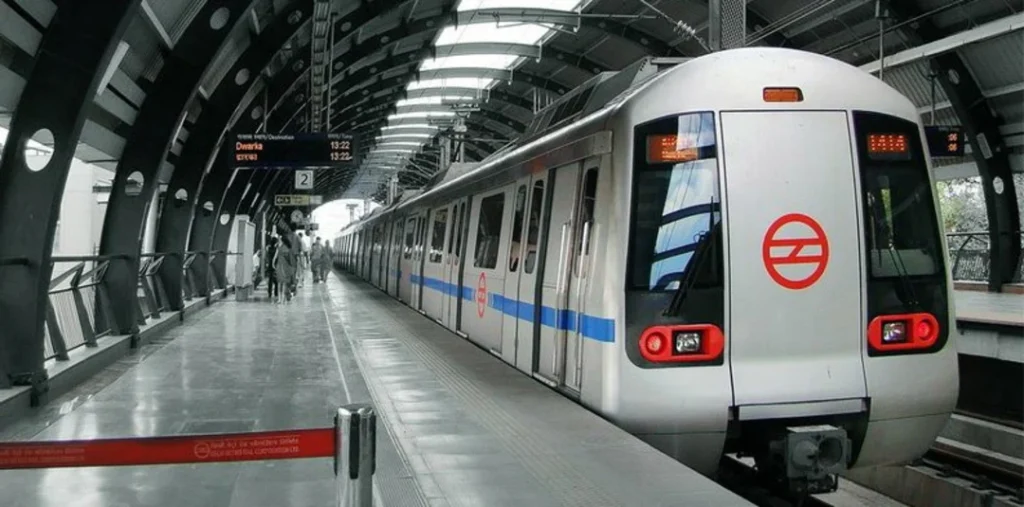
    Case Study 6: Delhi Metro Rail Corporation

    The Delhi Metro Rail Corporation (DMRC) is another shining example of the successful integration of BIM technology in major infrastructure projects in India. This advanced application of BIM has significantly improved project management, visualization, and cost estimation.

    The DMRC project involved the use of a 5D BIM model. This allowed the project team to visualize the metro rail network in 3D. It provided a comprehensive view of the project. It also facilitated efficient communication among various stakeholders. The 5D BIM model was particularly useful. It enabled accurate cost analysis. It also helped in setting up an optimal schedule for project activities. In this manner, my ability to execute high-calibre project management was shown. Our future task was done on time and within budget.

    The case of the Delhi Metro Rail project done with 5D BIM features stands as a match of the capability of BIM technology in the current infrastructure industry growth. In this way, it brings out the way BIM technology has an integral role to play in reshaping the infrastructural configuration of the country.

    Case study: Delhi Metro Rail Corporation

    The Strategic Return on Investment (ROI) of BIM

    Adopting BIM technology in construction projects has multiple benefits. It’s not just about keeping up with the latest technology. It also offers a strategic return on investment. BIM enables better management of resources. It improves coordination among stakeholders. It also makes project execution more efficient. All these factors contribute to cost savings in the long run.

    Conclusion

    The adoption of BIM in major Indian projects is a testament to the country’s commitment to embracing advanced construction methodologies. As projects adopt BIM, India’s construction becomes more efficient, sustainable, and innovative.

    Remember, the key to successful BIM implementation lies in understanding its capabilities and leveraging them effectively. Exploring BIM’s potential paves the way for more efficient and precise execution of future construction projects.


    For more information about engineering, architecture, and the building & construction sector, go through the posts related to the same topic on the Pinnacle IIT Blogs page.

    Find out more accurately what we are going to take off in the course of applying leading new technologies and urban design at Pinnacle IIT.

    Subscribe to our YouTube channel and blog websites to obtain all the up-to-date information relating to construction matters.